The Vibe Coding Wall: Why Every Fix Starts Breaking Two Other Things
You shipped fast. Cursor, Claude Code, or Lovable wrote most of it, and for two months it felt like cheating. Then one Tuesday a small bug turned into a three-day rabbit hole, and now every “small” change is breaking something else.
You’re at the wall.
This is the part of vibe coding nobody tweets about. The bragging tweets happen in week one. The “I shipped a SaaS!” posts happen in month one. The Substack postmortems happen in month six. What’s missing from the timeline is the middle — the wall around month three when the codebase you shipped starts pushing back.
It has a name now. Several, actually. Some call it the “90-day reckoning”. On the cleanup side, terms like “AI slop” and “de-slop” are catching on. Whatever you call it, the shape is the same: the AI-built app that felt solid last sprint now feels brittle, and every fix introduces two new regressions.
Why this happens around month three
The wall isn’t bad luck or one bad prompt. It’s a structural pattern that compounds invisibly, then collapses all at once.
No one ever held the whole architecture. When you vibe-code, every prompt sees a narrow slice — the file you’re editing, maybe a few imports. The AI never sees the global picture. Decisions made in week two contradict decisions made in week six, and nobody noticed because nobody, human or AI, was watching the whole system.
The AI optimized for “works,” not “fits.” Each generated file is internally consistent and passes its own tests. Across files, patterns drift. Auth gets implemented three different ways in three different routes. State management mixes useReducer and Zustand and useState in the same component. None of it is wrong on its own. All of it together is a mess.
Every fix added more code than it removed. GitClear’s analysis of 211 million lines showed AI assistants doubled code duplication and halved refactoring. AI tools love adding new functions over consolidating existing ones. By month three, the same logic exists in three places and you can’t tell which version is the canonical one.
Type safety quietly evaporated. Every time the AI hit a complex type, it reached for any as an escape hatch. By the time you notice, half your interfaces are any and TypeScript is silently letting bad data flow through your critical paths.
The result: at week three, your app is a building. At week twelve, it’s a building made of toothpicks held together by tape. It still stands. It just stops being something you can safely modify.
How you know you’re at the wall
You don’t need a code audit to spot the symptoms. You’re hitting the wall if:
- Every fix breaks two other things. The most reliable signal. If your last three bug fixes each caused new bugs, you’re past the point where prompting your way through it works.
- You can’t explain your own code. Someone asks how the auth flow works and you genuinely don’t know. AI wrote it, you accepted it, you forgot it.
- One file is doing twelve things. Your
dashboard.tsxorapi.tsstarted at 200 lines and is now 3,000. The AI keeps appending to whatever it last touched, you keep accepting, and nobody refactors. - You’re afraid to deploy. Not “should I add tests” afraid. “Last time we deployed, two unrelated features broke” afraid.
- You’ve started prompting longer and getting worse output. The AI is hitting its own context limit on your codebase. The more code it has to remember, the more it forgets.
- You’re seriously considering a rewrite. The fact that this is on the table is itself the wall talking.
Three or more of these and you’re not having a bad week. You’re at the wall.
What not to do
The first instinct is to prompt harder. Throw the failing code at the AI, ask for a fix, ship the fix. This usually makes it worse, fast.
You can’t vibe code your way out of a vibe coding mess. The same mechanism that built the wall — narrow context, no architectural anchor, no one holding the whole picture — will make every patch shallower than the problem it’s patching. By the third “small” fix, you’ve added new patterns on top of the broken ones.
The second instinct is to start over. This is usually wrong too. The product works. Users are paying. The architecture is salvageable. What you’re missing isn’t new code, it’s a map of the code that already exists.
What to do instead
The actual move is uncomfortable: stop adding features for one day, and find out what you actually built.
That sounds soft. It isn’t. The wall isn’t a code problem, it’s a context problem. You can’t fix a system whose shape you can’t see. Mapping comes before patching.
What you need from the map:
- Which modules exist and how they actually depend on each other (not how you remember it)
- Where the architectural drift accumulated — auth implemented three ways, state managed five ways, the kind of contradictions a senior reviewer would catch in an hour
- Which tests cover the critical paths and which don’t
- Where the security holes are hiding, especially in dependencies
- The 3-5 things most likely to cause your next production incident
Once you have the map, the next move is obvious: triage by risk, not by what the AI keeps surfacing in your IDE. Fix the dependency CVEs first (usually one-line version bumps). Add tests to the two or three flows that handle money or user data. Break up the 600-line components that every feature has to touch. Stop accepting any types.
Then, and only then, go back to shipping features. The wall is only the wall once. After that, you have the map.
And this time, don’t wait for the next wall. Run the check weekly while you keep building. Architectural drift shows up as a small finding you fix in 20 minutes, not as a structural wall at month three. The wall is what happens when nobody looks for three months.
Where StackGrit fits
This is the diagnostic step. StackGrit reads your whole codebase, runs the kind of architecture-and-security review a senior engineer would do at the wall moment, and gives you a plain-language report: what’s there, what’s risky, what to fix first. It’s the map you never made.
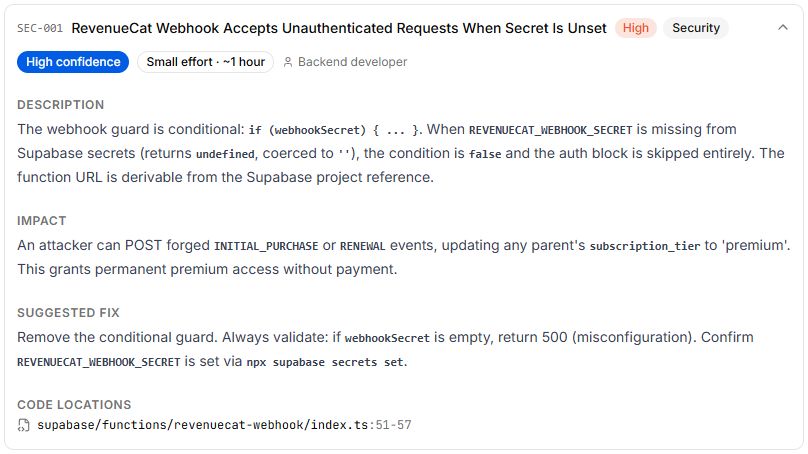
A typical report surfaces 20-30 findings like that one, ranked by severity, each with a location and a starting move. If a finding doesn’t make sense, the report has a chatbot that answers follow-up questions on your specific codebase, so the “I don’t understand my own code” part of the wall gets unstuck first. Once you know which finding to ship, Fix with AI hands it back to Cursor or Claude as a structured prompt with all the context already attached, no copy-paste.
The point isn’t to fix everything in one pass. Pick the top one or two, ship them, run the analysis again, watch the score move.
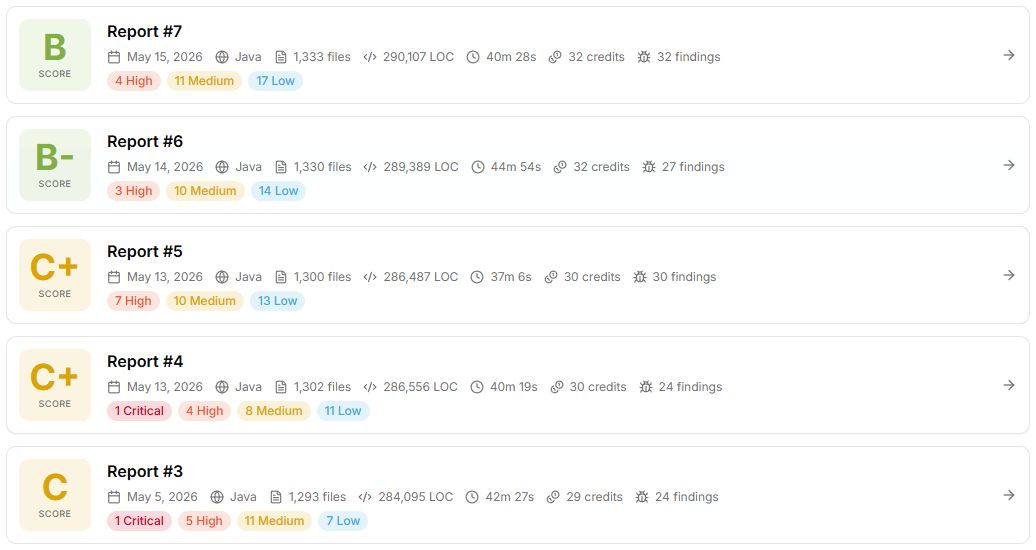
The first report is free. No credit card. You can have it in about 45 minutes.
If you want to see what this looks like in practice, we ran the same analysis on a real vibe-coded SaaS at month four: Vibe Coding Produced Your MVP. Now What? — security CVEs, 890-line mega-components, and a licensing time bomb the builder didn’t know existed.
Built fast and hit the wall? Find out what’s actually in there before the next fix makes it worse.