StackGrit vs ForgeMaster: Code Health vs Team Health
From the outside it all looks fine. Commits are flowing, sprints are closing, the team shows up to standup. But as a CTO or founder you can’t actually tell whether the codebase is rotting, whether anyone is about to burn out, or whether the architecture will hold for the next round of features.
Two engineering intelligence platforms have emerged to answer different parts of that question. ForgeMaster watches your team’s rhythm. StackGrit audits your code. Both connect to GitHub read-only. Both produce reports a non-engineer can read. Both target the same buyer: founders, CTOs, engineering managers.
But they look at different things, and confusing them leads to picking the wrong tool. This is an honest comparison.
What ForgeMaster does
ForgeMaster turns GitHub activity — commits, PRs, reviews, incidents — into operational signals about your team. It runs continuously and surfaces things like:
- Burnout detection — early indicators that a contributor is at risk before attrition shows up
- Ownership concentration — areas where a single person is doing everything
- Delivery rhythm — review slowdowns, cycle-time shifts, PR backlog
- Operational health — incidents, downtime, postmortem compliance, MTTA and MTTR
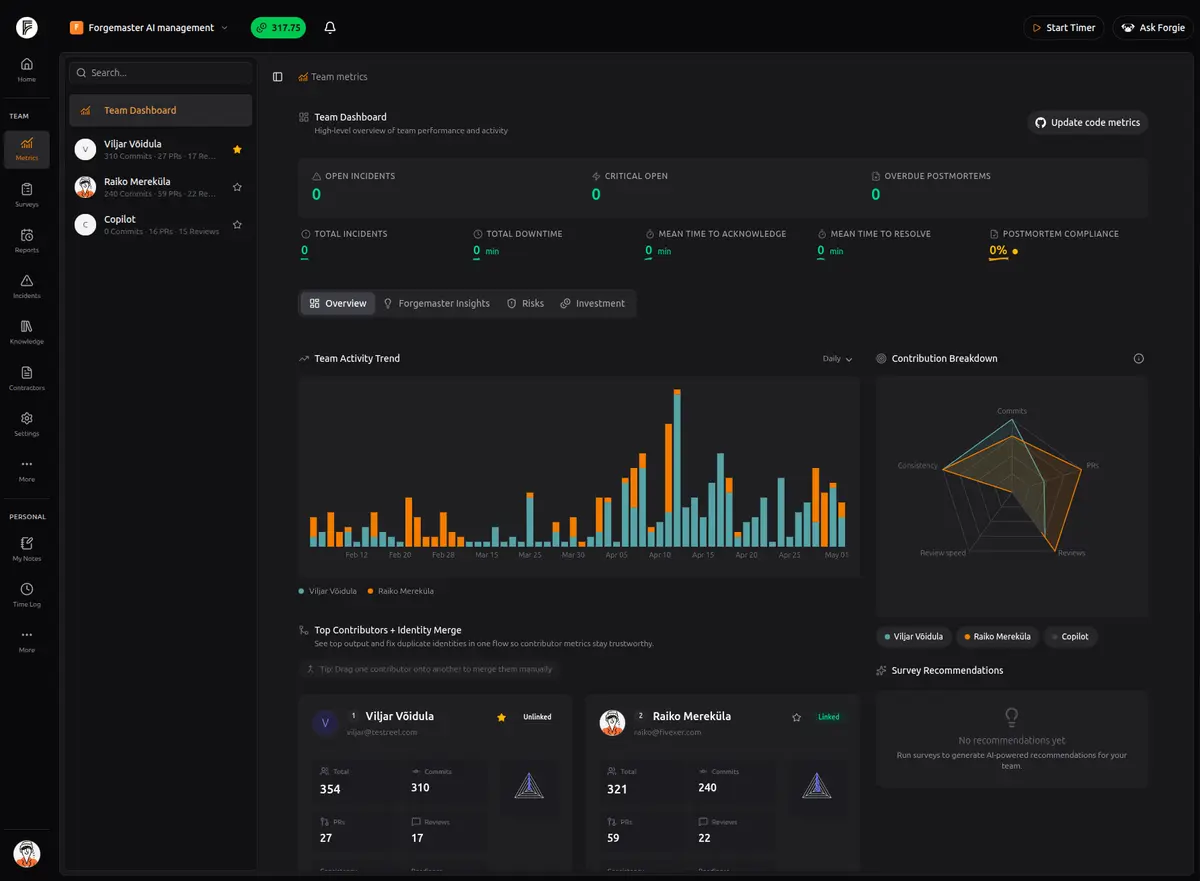
The output is a live dashboard plus weekly digests for leadership. The mental model: “How is the team performing, and where are the people-risks?” It treats engineering as an ongoing operation that needs monitoring.
Pricing: €99/month Starter (1 team, 3 repos), €199/month Growth (up to 5 teams, 25 repos), Enterprise with self-hosted deployment.
Built for: Founders, CTOs, and engineering managers who want a continuous read on team health and delivery rhythm, not a one-time snapshot.
What StackGrit does
StackGrit runs an AI audit across the entire codebase and produces a structured health report. It looks at what’s in the code, rather than how the team is performing around it:
- Architecture — coupling, layering, structural issues
- Code Quality — complexity hotspots, god files, duplication
- Security — hardcoded secrets, vulnerable patterns
- Test Coverage — modules with zero tests, fragile areas
- Dependencies — outdated packages, CVE detection
- Data Model — schema soundness
- Team Knowledge — knowledge ownership map from git history, bus factor risk
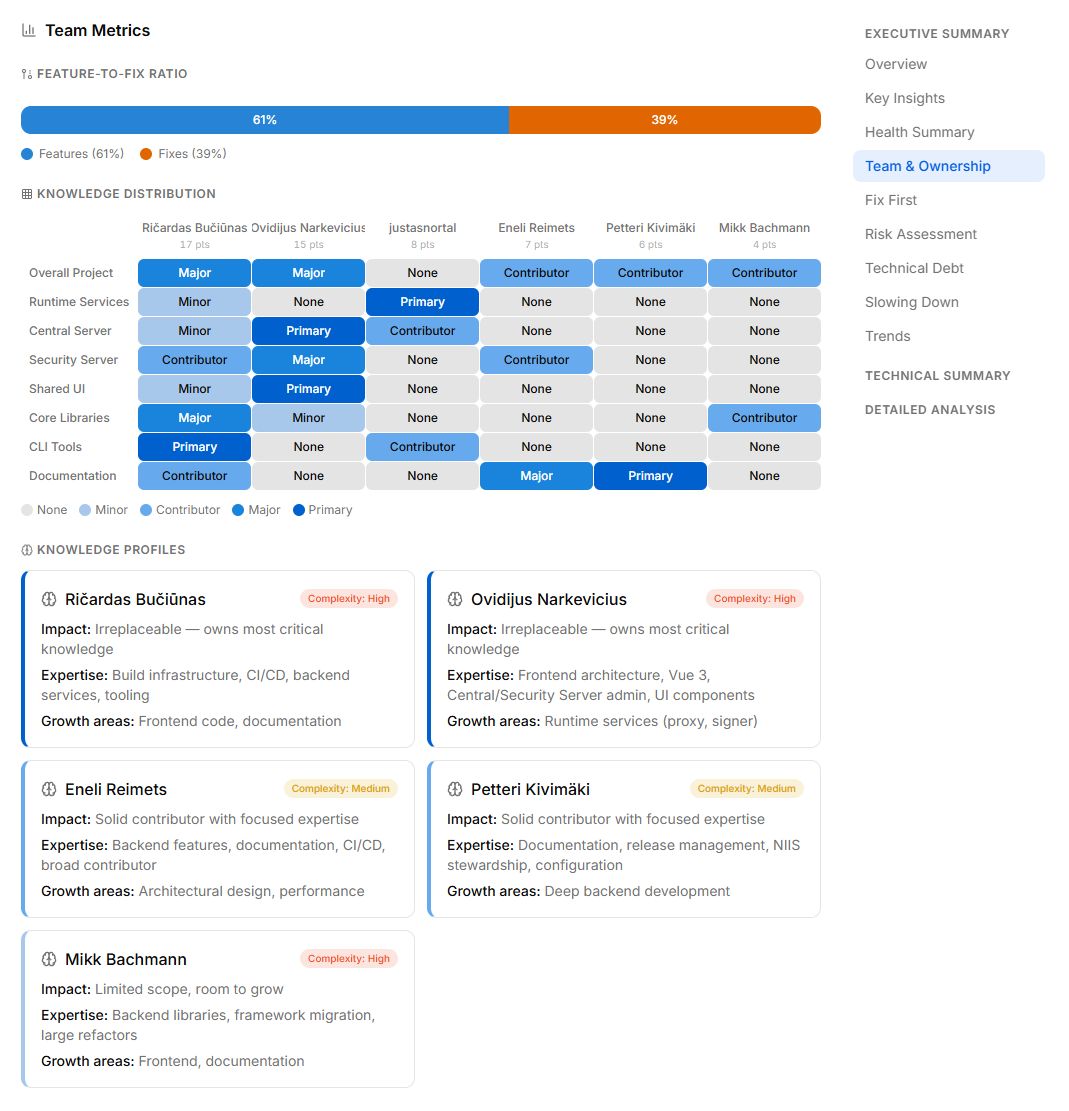
The output is a plain-language report with grades across seven dimensions, prioritized findings, and “fix first” recommendations. The mental model: “What’s the actual condition of the asset?” It treats the codebase as something you periodically audit, like a building inspection.
Pricing: $29/month Starter (covers about 2 analyses), up to $299/month. Run on-demand.
Built for: Engineering managers, project owners, and anyone who needs to understand what’s in a codebase without reading code, including non-technical stakeholders evaluating outsourced work or inherited projects.
Side by side
| ForgeMaster | StackGrit | |
|---|---|---|
| Primary question | ”How is the team performing?" | "What’s in the codebase?” |
| Inputs | Git activity, incidents, PR/review data | Source code, dependencies, git history |
| Output style | Live dashboard + weekly digests | On-demand audit report |
| Cadence | Continuous monitoring | Periodic snapshots with trend tracking |
| Code-level analysis | Indirect (PR/commit patterns) | Direct (architecture, quality, security, deps) |
| People signals | Burnout, workload, contribution patterns | Knowledge ownership map, bus factor |
| Operational metrics | Incidents, downtime, MTTA/MTTR | Not covered |
| Primary audience | CTOs, founders, engineering managers | CTOs, founders, eng managers, non-technical stakeholders |
| Pricing entry point | €99/month | $29/month |
| Setup | Connect GitHub, runs continuously | Connect repo, run analysis |
They don’t compete — they answer different questions
A weekly ForgeMaster digest sounds like: “Reviews slowed 30% this week. Two contributors are showing burnout signals. Three incidents, mean time to resolve up 40%.”
A StackGrit report sounds like: “Architecture grade B-. Test coverage D+. Security C+ with 60 known CVEs across outdated dependencies. Three god files over 1,000 lines. Bus factor of one on the runtime services subsystem.”
Neither replaces the other. ForgeMaster won’t tell you that 52% of your dependencies are outdated. StackGrit won’t tell you that someone has worked every weekend for a month.
If the team is delivering smoothly but you’ve inherited a code-rot problem you don’t know about, StackGrit catches that and ForgeMaster doesn’t. If the codebase is fine but the team is overloaded, ForgeMaster catches that and StackGrit doesn’t.
Both touch “team” — but differently
This is where the overlap can feel confusing. Both tools have a “team” view, both pull from git history, and both surface ownership signals. But the questions are different.
ForgeMaster’s team view is operational: contribution patterns over time, activity trends, review speed, response to incidents. It answers “how is the team running this week, and is anything trending in a bad direction?”
StackGrit’s team view is structural: a knowledge distribution matrix showing which contributor owns which subsystem, with knowledge profiles flagging who is irreplaceable and where the bus factor is one. It answers “if someone left tomorrow, what would we lose, and where is ownership too concentrated?”
Same input data, different questions. ForgeMaster is watching the river; StackGrit is mapping the riverbed.
When to use what
Use ForgeMaster when:
- You want continuous monitoring of team and delivery health
- Burnout, attrition risk, or workload distribution are real concerns
- You run incidents and want operational metrics in one place
- You want a weekly digest in your inbox without prompting it
Use StackGrit when:
- You’re auditing a codebase you didn’t write — outsourced work, an acquisition, an inherited project
- You need to know what’s actually in the code: security issues, architectural debt, test gaps
- A non-technical stakeholder needs a report they can read without an engineer translating
- You want a baseline you can re-run quarterly to track real change
- You’d otherwise be looking at hiring a code audit consultant for a one-time review
Use both when:
- You’re a CTO or founder who wants full coverage. ForgeMaster catches the people and rhythm. StackGrit catches the code itself. Together they cover what a thorough quarterly review would, on a continuous basis.
The honest version
If you only have budget for one, pick the one that matches the question keeping you up at night. If your team is humming but the codebase is a black box, you need an audit. If the codebase is fine but you can’t tell whether someone’s about to quit, you need ongoing monitoring.
Most teams eventually want both, at different stages. Early on: a code audit when something changes hands. Growing team: operational monitoring as headcount scales. Mature: both, on different cadences.
ForgeMaster and StackGrit aren’t really competitors. They’re adjacent tools for the same audience, answering different questions. If you already use one and the other addresses something you’ve been wondering about, the free tiers will tell you in an afternoon whether it’s worth the budget.
Get your free StackGrit project health report → or take a look at ForgeMaster for continuous team and delivery intelligence.