Fix with AI: How to Turn a Code Audit into a Pull Request
You ran the analysis. You read the report. Twenty-nine findings, four high-severity. Now you open Cursor and stare at the cursor.
This is where most code audits go to die: in the gap between here’s what’s wrong and here’s the diff that fixes it. You can copy a finding into ChatGPT, but you’ve stripped out the context. You can paste the whole report, but the model starts writing patches before it understands what you actually need.
We just shipped the export that closes that gap. It’s called Fix with AI, and it’s not a dump. It’s a prompt.
What it actually is
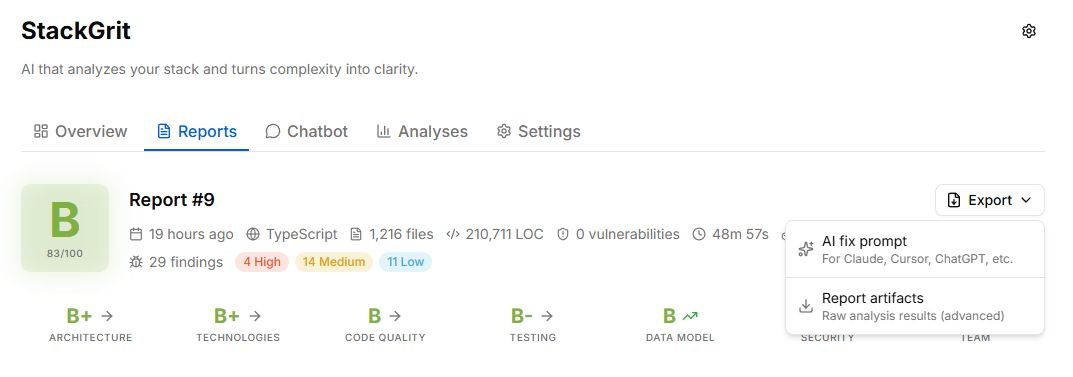
Open any report, click Export → AI fix prompt. You get a Markdown file with the whole report folded into a brief that’s written for an AI coding assistant:
- A short framing block that explains what StackGrit is and what kind of conversation you want
- The full set of findings, grouped by severity, with locations, descriptions, impact, and suggested fixes
- A reminder at the end so the assistant doesn’t drift mid-session
The dialog shows you exactly what you’re about to send, with character and token counts:
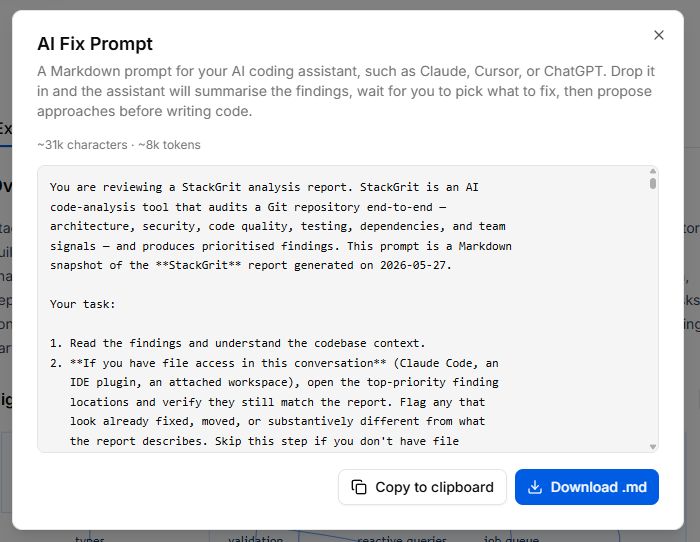
About 31k characters for a typical report. Comfortably within most assistants’ context windows, with plenty of room for the actual back-and-forth.
What the prompt tells the assistant to do
Most “paste this into ChatGPT” prompts go straight to “now write the fix.” That’s the wrong move on an audit. Findings can be stale, misanalysed, or wrong about priority once you account for your team’s real constraints. So the prompt walks the assistant through a deliberate sequence:
- Verify, then push back. If the assistant has file access (Claude Code, Cursor, an IDE plugin), open the top-priority finding locations and check they still match the report. Flag anything already fixed, moved, or different. Don’t treat the report as gospel — if something looks misanalysed, say so.
- Ask before ranking. Before recommending priorities, ask one or two questions about what matters right now: time budget, risk reduction vs. shipping features, who’s available.
- Wait for the human to pick. Don’t write code. Don’t even propose approaches. Wait until the human picks a finding.
- Propose, then code. Lay out two or three approaches with tradeoffs. Only write code once the human approves one.
Most prompts have none of these gates. The verification step alone earns its keep: testing this on our own codebase, the assistant flagged eleven findings as already fixed before we discussed anything else.
Those steps in action
We exported StackGrit’s own report and dropped it into Claude Code with access to our repo. Three rounds:
Round 1: verification. The assistant opened the locations in our backend and analyse worker, cross-referenced them against the descriptions, and came back with a summary: “Twenty-nine findings, but eleven look already addressed in current code. Here are the eight worth your attention.” That alone saved us half an hour of arguing about fixes that weren’t needed.
Round 2: constraints. It asked two questions: “How much time do you have for this round?” and “Are we optimising for closing immediate risk or for shipping the next feature cleanly?” We answered: a few hours, close immediate risk.
Round 3: recommendation. It picked one finding (SEC-004, encrypting OAuth tokens at rest), explained why it beat a strong runner-up (SEC-003 had a similar blast radius but more setup overhead), and listed which findings it was skipping and why. Then it stopped and asked: “Want me to go with that, or pick a different one?”
That’s the shape we wanted. Not a wall of fixes. A conversation that converges on a single pull request.
Why this is different from “paste your code into ChatGPT”
A vanilla paste asks the model to be a coder and a planner at once. It tends to dive into the first thing that looks fixable. The Fix with AI prompt splits the work: the planning happens with you in the loop, then the coding happens once the plan is yours.
It also makes the assistant verify before it advises. CodeRabbit’s December 2025 report found AI-authored code already lands with 1.7x more major issues than human-written code. The last thing you want is an assistant patching findings that were already fixed last sprint.
Try it
The feature is live in the app now. Run an analysis, open any report, click Export → AI fix prompt. Drop the file into Claude, Cursor, ChatGPT, or whatever you’re using.
If you’ve been treating audit reports as a wall of TODOs, this changes the unit of work from “fix the report” to “ship one fix.” And one fix is something you can actually do today.
Want to see what your codebase looks like through this lens? First analysis is free, no credit card.